Exam metadata
Examy can embed data about the rubric and questions of an exam directly into the compiled PDF as an attached JSON file with Markdown strings. This data can then be read by tools that process the PDF.
Embedding metadata in the PDF
The global config’s embed-metadata option can be used to attach data to the PDF as JSON files.
#show: exam.with(embed-metadata: true)embed-metadata: false- (default) Nothing is attached.
embed-metadata: "rubric"- The rubrics are attached as
examy-rubric.json. embed-metadata: "question-regions"- Where each question is on the page is attached as
examy-regions.json. embed-metadata: true- Both are attached.
embed-metadata: auto- Question regions are always attached and rubric information is only attached when solutions are shown.
As with solutions, a command-line setting can be used to override the exam’s settings. Its value is written without quotes.
# the answer key, with its rubrics attached, for a grading tool
typst compile --input show-solutions=true --input embed-metadata=true exam.typ
Attaching data does not change the layout of the exam. If a document holds several exams, the second exam’s files are named examy-rubric-2.json and examy-regions-2.json, and so on.
Rubric data
Rubric data for an exam can be embedded regardless of whether rubrics are shown. Alternatively, rubric data can be accessed directly via the command line or displayed in a document with a query command.
typst eval --in exam.typ --pretty 'query(<examy-rubric>).first().value' > examy-rubric.json#show: exam.with(exam-name: "Example Exam")
#set text(size: 0.8em)
#question(points: 2, rubric: [
#rubric(points: 1)[Uses $A = pi r^2$]
#rubric(points: 1)[Gets $9 pi$]
])[What is the area of a circle of radius 3?]
#question(points: 3, rubric: [
#rubric(points: 1)[Simplifies]
#rubric(points: -1, annotation: [once only])[Sign error]
])[Differentiate $sin(x^2)$.]
*Rubric as JSON*
#context {
// Get the rubric data as JSON
let data = query(<examy-rubric>).first().value
raw(json.encode(data), lang: "json", block: true)
}#import "@preview/examy:1.1.0": *
#show: exam.with(exam-name: "Example Exam")
#set text(size: 0.8em)

#question(points: 2, rubric: [
  #rubric(points: 1)[Uses $A = pi r^2$]
  #rubric(points: 1)[Gets $9 pi$]
])[What is the area of a circle of radius 3?]
#question(points: 3, rubric: [
  #rubric(points: 1)[Simplifies]
  #rubric(points: -1, annotation: [once only])[Sign error]
])[Differentiate $sin(x^2)$.]

*Rubric as JSON*
#context {
  // Get the rubric data as JSON
  let data = query(<examy-rubric>).first().value
  raw(json.encode(data), lang: "json", block: true)
}Using .first().value retrieves the rubric from the first exam in the document (if your document only has one exam, then the first exam will be your exam), and .at(1).value, .at(2).value, etc. can be used to retrieve rubrics from other exams.
A TypeScript schema for the embedded examy-rubric.json is shown below. Questions with no points value will be given a null value for the points field.
export type Question = {
  /**
   * Position among its siblings at each level, from 0. E.g. `[0, 2]`
   * for question 1 (c).
   */
  "address": number[];
  /** Label as printed on the exam. E.g. `"1 (c)"`. */
  "display-name": string;
  /** `1` for a question, `2` for a part, and `3` for a subpart. */
  "level": 1 | 2 | 3;
  /**
   * Points given to it directly, not counting its parts; `null` if
   * none are given.
   */
  "points": number | null;
  /**
   * Bonus points given to it directly, not counting its parts; `null`
   * if none are given.
   */
  "bonus-points": number | null;
};

export type RubricItem = {
  "type": "item";
  /**
   * Points the item awards (negative for a deduction); `null` if none
   * are given.
   */
  "points": number | null;
  /** Markdown representation of the item's text, with LaTeX math. */
  "description": string;
  /**
   * Markdown representation of the item's annotation, with LaTeX
   * math; `null` if none.
   */
  "annotation": string | null;
};

export type RubricNote = {
  "type": "note";
  /** Markdown representation of the note's text, with LaTeX math. */
  "text": string;
};

export type RubricGroup = {
  "type": "group";
  /**
   * Markdown representation of the group's title (its first
   * paragraph), with LaTeX math.
   */
  "title": string;
  /**
   * Markdown representation of the text from the title to the first
   * item; `null` if none.
   */
  "note": string | null;
  /**
   * Markdown representation of the group's annotation. E.g.
   * `"pick one"`; `null` if none.
   */
  "annotation": string | null;
  /** The items, groups, and notes in the group, in order. */
  "items": RubricEntry[];
};

/** An entry of a rubric: an item, a group of entries, or a note. */
export type RubricEntry = RubricItem | RubricGroup | RubricNote;

/** The rubric of a question/part/subpart. */
export type Rubric = Question & {
  /** The rubric's items, groups, and notes, in order. */
  "rubric": RubricEntry[];
};

export type ExamyRubric = {
  /**
   * Identifies the data. An incompatible later version will have
   * another `format`.
   */
  "format": "examy-rubric";
  /**
   * Markdown representation of the global `config`'s `exam-name`;
   * `null` if it is not set.
   */
  "exam-name": string | null;
  /** Each question/part/subpart that has a rubric, in order. */
  "rubrics": Rubric[];
};
Question regions
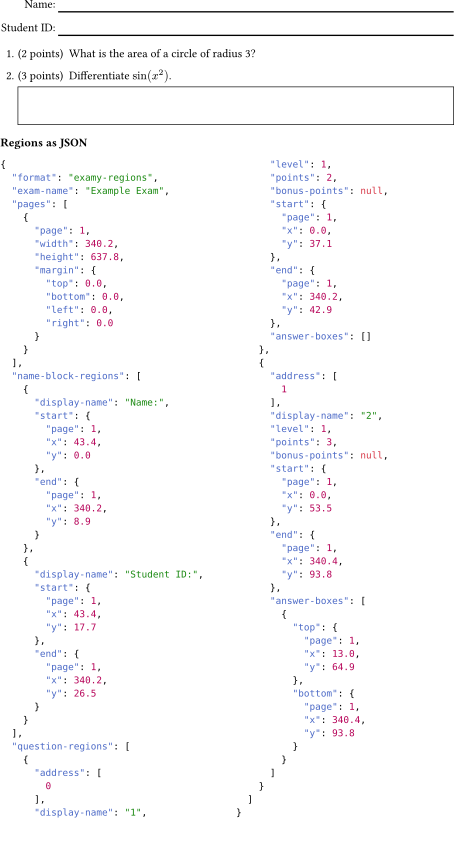
Data about the region that each question occupies can be embedded in the PDF as examy-regions.json or retrieved from the command line via a Typst query command.
typst eval --in exam.typ --pretty 'query(<examy-regions>).first().value' > examy-regions.jsonAll positions are in points from the top left of the page (rounded to one decimal place). Question regions overlap the regions of their parts, and the regions for #answer-box[..]s contained in a question/part/subpart are included in an answer-boxes array.
If any name-block lines are present, their regions are included in name-block-regions.
#show: exam.with(exam-name: "Example Exam", embed-metadata: true)
#set text(size: 0.8em)

#name-block()

#question(points: 2, rubric: [
  #rubric(points: 1)[Uses $A = pi r^2$]
  #rubric(points: 1)[Gets $9 pi$]
])[What is the area of a circle of radius 3?]
#question(points: 3, rubric: [
  #rubric(points: 1)[Simplifies]
  #rubric(points: -1, annotation: [once only])[Sign error]
])[
  Differentiate $sin(x^2)$.
  #answer-box(width: 100%, height: 1cm)[]
]

*Regions as JSON*
#context {
  // Get the regions data as JSON
  let data = query(<examy-regions>).first().value
  // Two columns: the first is filled to this height, then the second
  block(height: 17.5cm, columns(2, raw(json.encode(data), lang: "json", block: true)))
}#import "@preview/examy:1.1.0": *
#show: exam.with(exam-name: "Example Exam", embed-metadata: true)
#set text(size: 0.8em)
#name-block()
#question(points: 2, rubric: [
#rubric(points: 1)[Uses $A = pi r^2$]
#rubric(points: 1)[Gets $9 pi$]
])[What is the area of a circle of radius 3?]
#question(points: 3, rubric: [
#rubric(points: 1)[Simplifies]
#rubric(points: -1, annotation: [once only])[Sign error]
])[
Differentiate $sin(x^2)$.
#answer-box(width: 100%, height: 1cm)[]
]
*Regions as JSON*
#context {
// Get the regions data as JSON
let data = query(<examy-regions>).first().value
// Two columns: the first is filled to this height, then the second
block(height: 17.5cm, columns(2, raw(json.encode(data), lang: "json", block: true)))
}
A TypeScript schema for the embedded examy-regions.json is shown below. Question is the same as in the rubric data.
/**
 * A point on a page, in points (pt) from the page's top left, to a
 * tenth of a point.
 */
export type Position = {
  /** Page number, counting from 1. */
  "page": number;
  "x": number;
  "y": number;
};

export type Question = {
  /**
   * Position among its siblings at each level, from 0. E.g. `[0, 2]`
   * for question 1 (c).
   */
  "address": number[];
  /** Label as printed on the exam. E.g. `"1 (c)"`. */
  "display-name": string;
  /** `1` for a question, `2` for a part, and `3` for a subpart. */
  "level": 1 | 2 | 3;
  /**
   * Points given to it directly, not counting its parts; `null` if
   * none are given.
   */
  "points": number | null;
  /**
   * Bonus points given to it directly, not counting its parts; `null`
   * if none are given.
   */
  "bonus-points": number | null;
};

/** A page the exam is on, in points (pt). */
export type Page = {
  /** Page number, counting from 1. */
  "page": number;
  "width": number;
  "height": number;
  /**
   * The page's margins. With mirrored margins, `left` and `right` are
   * this page's.
   */
  "margin": { "top": number; "bottom": number; "left": number; "right": number };
};

/** A line of a `#name-block()`. */
export type NameBlockRegion = {
  /**
   * Markdown representation of the line's prefix. E.g. `"Name:"`;
   * `null` if none.
   */
  "display-name": string | null;
  /** Top left of the line. */
  "start": Position;
  /** Bottom right of the line. */
  "end": Position;
};

/** An answer box, to the outside of its outline as it is drawn. */
export type AnswerBox = {
  /** Top left of the box. */
  "top": Position;
  /** Bottom right of the box. */
  "bottom": Position;
};

/** Where a question/part/subpart is on the page. */
export type QuestionRegion = Question & {
  /** Top left of its label. */
  "start": Position | null;
  /**
   * Bottom right of everything in it, its parts and answer boxes too.
   */
  "end": Position | null;
  /** The answer boxes in its own text, not its parts'. */
  "answer-boxes": AnswerBox[];
};

export type ExamyRegions = {
  /**
   * Identifies the data. An incompatible later version will have
   * another `format`.
   */
  "format": "examy-regions";
  /**
   * Markdown representation of the global `config`'s `exam-name`;
   * `null` if it is not set.
   */
  "exam-name": string | null;
  /** Each page the exam is on, in order. */
  "pages": Page[];
  /** Each line of the exam's `#name-block()`, in order. */
  "name-block-regions": NameBlockRegion[];
  /** Each question/part/subpart, in order. */
  "question-regions": QuestionRegion[];
};